
BEACH ASSET PACK
ROLES/CONTRIBUTIONS
SOLO PROJECT
- Unreal Engine 5 understanding
- UE5 material creation
- UE5 Baked lighting
- Substance 3D Designer proficiency
- Tileable texture creation
- Optimised 3D asset workflow
- Environment composition
PROJECT OVERVIEW
A beach asset pack made for the purpose of bettering my skills in several different areas of asset/material creation and implementation workflows. With optimisation and ease of use in mind, this pack contains several low poly palm trees and rocks with multiple LOD levels, as well as stunning tileable landscape materials to be used with the landscape blending material. Also included is a highly customisable water material.
SHOWCASE
SHOTS


THE PROCESS


3D MODELS
For this beach asset pack I decided I'd do only a handful of models, as I wanted to focus more on learning tileable textures and Unreal Engine materials. This fact meant I only did a few palm trees, rocks, and I reused the palm tree branches for plants.
I also kept them very low poly to keep with the optimised goal that I'm aiming for.
Something else I touched on for this project was sculpting high poly meshes in Blender, which I'm quite unfamiliar with. I have, however, done similar stuff in Autodesk Mudbox. This made it rather easy to pick up and figure out.
LOD LEVELS
Typically when 3D artists are making optimised assets they will create LOD levels for each of the models, which are lower-poly count versions of the same object that replace the original mesh when they're far away from the camera.
I haven't created LOD models before, and so this was a perfect time to play around with them. Blender makes it extremely easy to get nice results using their 'Decimate' modifier. One thing I had to keep in mind while doing LOD's was to make sure their UV maps were positioned in the same spots as the original model.


TEXTURING
I wanted to branch out from my typical flat colour style, and so I tried to go with a much more hand painted and cartoony, almost 'Studio Ghibli', theme for the objects.
Something I kept in mind based on previous projects was, when making game ready assets, baking lighting on the textures in Substance Painter doesn't work very well unless there is no lighting in the game and it utilises unlit materials.
Since this in meant to be an asset pack used with Unreal Engine 5, a common engine for fancy lighting, I made sure to stay away from this method, which improved my texturing a lot this time around and makes the pack much more modular.
TILEABLE TEXTURES
One of my favourite parts about the project was learning Substance Designer and making the tileable textures in that program. Designer is a node based texture creation tool, something that I've never done before, but I was very interested in this workflow.
After the many hours spent learning, I've gotten my head around the gist of how the node based system works, and I love it. The non-destructibility of the workflow made creating a dry version of the sand texture extremely easy, and it blends super seamlessly with the wet sand in engine.
As a side affect, Designer has also improved my understand of shaders and materials in both Unity and UE5. Since the node based system is very similar between all programs, I found myself able to understand everything so much quicker.


TERRAIN MATERIAL
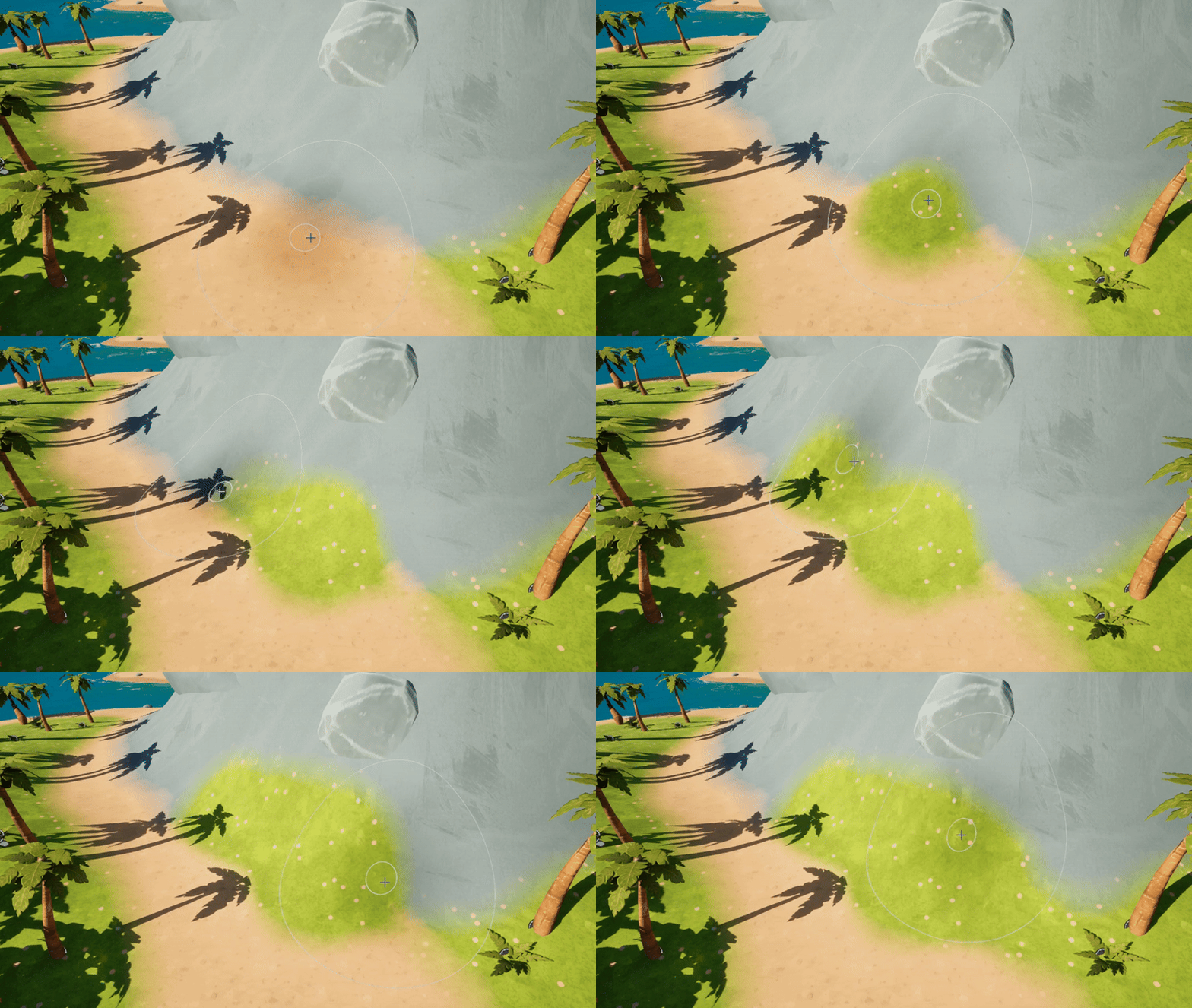
Being my first time using UE5's materials, it was a valuable learning experience for me to create a terrain blend material specifically for the landscape tool.
Because I was able to export height maps for the textures created in Designer, I was also able to make the textures blend based on height maps instead of just painted weight maps. This gave the textures a much more seamless transition between different surface types.
The terrain material also contains a ton of parameters to customise many different aspects. These range from the scale and tiling of the textures, either up close or far away from the camera, to the tint and tint variation to give the materials less of a tiled look at a distance.
WATER MATERIAL
What would a beach asset pack for UE5 be without a highly customisable water material?
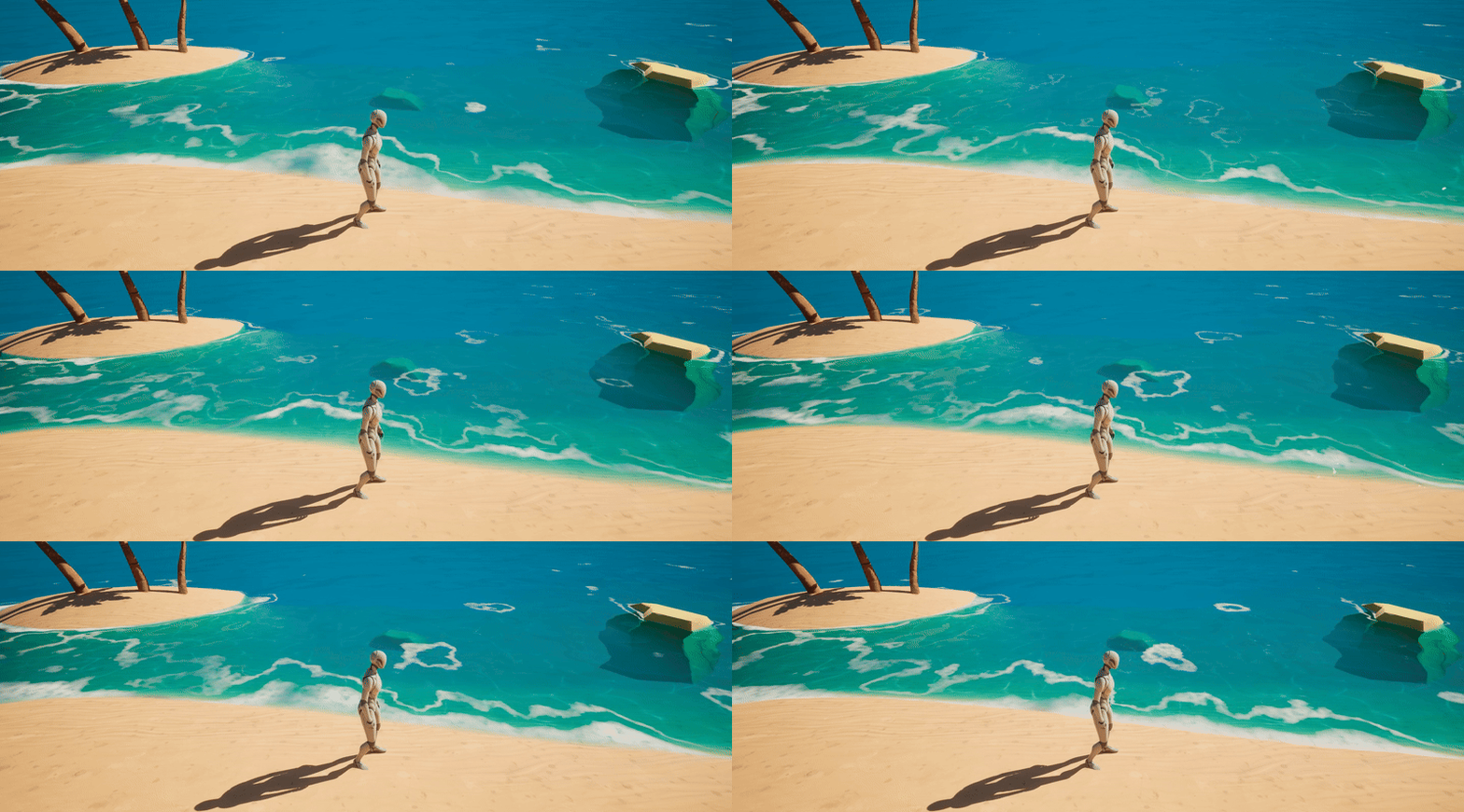
While a lot of water materials are very similar in UE5, I wanted to make mine stand out a little bit. For this reason I wanted to give the foam ripples a bit of distortion and pan the distortion. This makes the distortion not repetitive and gives it a very dynamic look compared to straight lines moving towards the shoreline.
I also gave the water material over 30 organised parameters. This lets the user toggle on and off almost every part of the water to make it as optimised or pretty looking as they want, depending on their needs. The parameters feature tooltips, as some of the names are a bit ambiguous. These tooltips have a more detailed explanation to help clear up confusion.


DEMO ENVIRONMENT
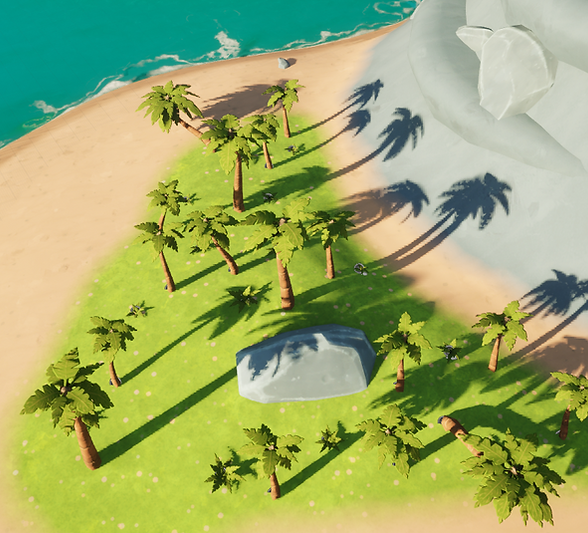
Although not mandatory for publishing an asset pack on FAB, I wanted to create a demo environment. This was to help strengthen my efficiency with building levels in UE5, while also giving me some cool photo opportunities to hopefully get more clicks on the pack.
I was really happy with the result of the environment. I was able to achieve quite an aesthetic island, even with the limited amount of props to play around with.
UE5 LIGHTING
Unexpectedly the hardest part of the project. I was required by FAB marketplace to build the lighting on all of my levels. This didn't seem like much of an issue to me, however I was unaware of the concept of lightmaps and a second UV channel for models up until this point.
I only became aware of lightmaps when baking lighting on models and wondering why the lighting was extremely dark on some objects UV's and there were very obvious seams between the UV tiles.
It turns out models require a second UV channel for baked lighting. It makes sense why I haven't come across this issue before, as my other projects used no lighting or real time lighting, never baked lighting. After unwrapping all of my model's UV's into a second UV channel and reimporting I was able to fix all issues.
FINAL COMMENTS
This project was able to provide me with all of the outcomes I was wanting from it, and more. From learning a new way to create tileable textures, to learning about baked lighting and lightmaps, this project was the perfect playground for me to get better. Not only this, but publishing this on FAB for a price meant I had to create a business, and so I'm now much more set up to sell games, asset packs, or models when I get to that stage.